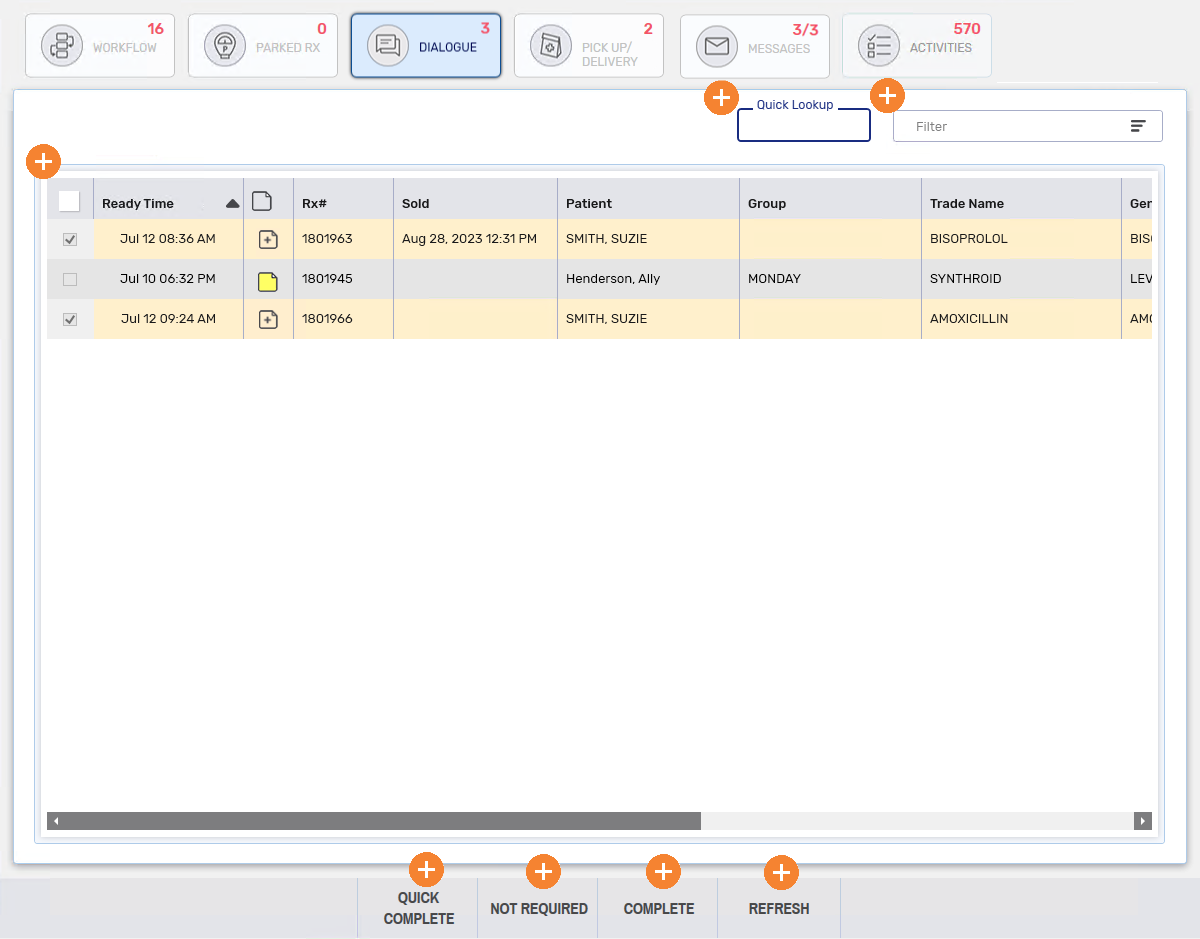
Dialogue Dashboard
With digitial workflow, Dialogue or patient counseling can be done electronically.
All new prescriptions (including authorizations, rebills and amends) are automatically flagged as Dialogue Required display in the Dialogue dashboard once they have passed Data Entry.
Additional types of prescriptions, such as refills, can also display if the Dialogue Required is selected in Technical Validation or Clinical Review.
With digitial workflow, Dialogue or patient counseling can be done electronically, if the E-Dialogue dropdown in Workflow Preferences is set to New or All.
Certain types of prescriptions will display depending on the E-Dialogue preference:
-
New - All new prescriptions (including authorizations, rebills and amends) are automatically flagged as Dialogue Required display in the Dialogue dashboard once they have passed Data Entry.
Additional types of prescriptions, such as refills, can also display if the Dialogue Required is selected in Technical Validation or Clinical Review.
-
All - all types of prescriptions are automatically flagged as Dialogue Required and display in the Dialogue dashboard once they have passed Data Entry.
-
No - the Dialogue tile is removed from the Workbench and cannot be accessed.
The Dialogue dashboard is only available if you have the E-Dialogue dropdown in Workflow Preferences set to New or All. If not, you can still perform dialogue through:
To learn more about the Dialogue dashboard, select the expander icons  in the image below.
This section contains the following topic:
Dialogue from the Dialogue Dashboard